Overview
seekr turns search-and-replace into an inspectable R workflow.
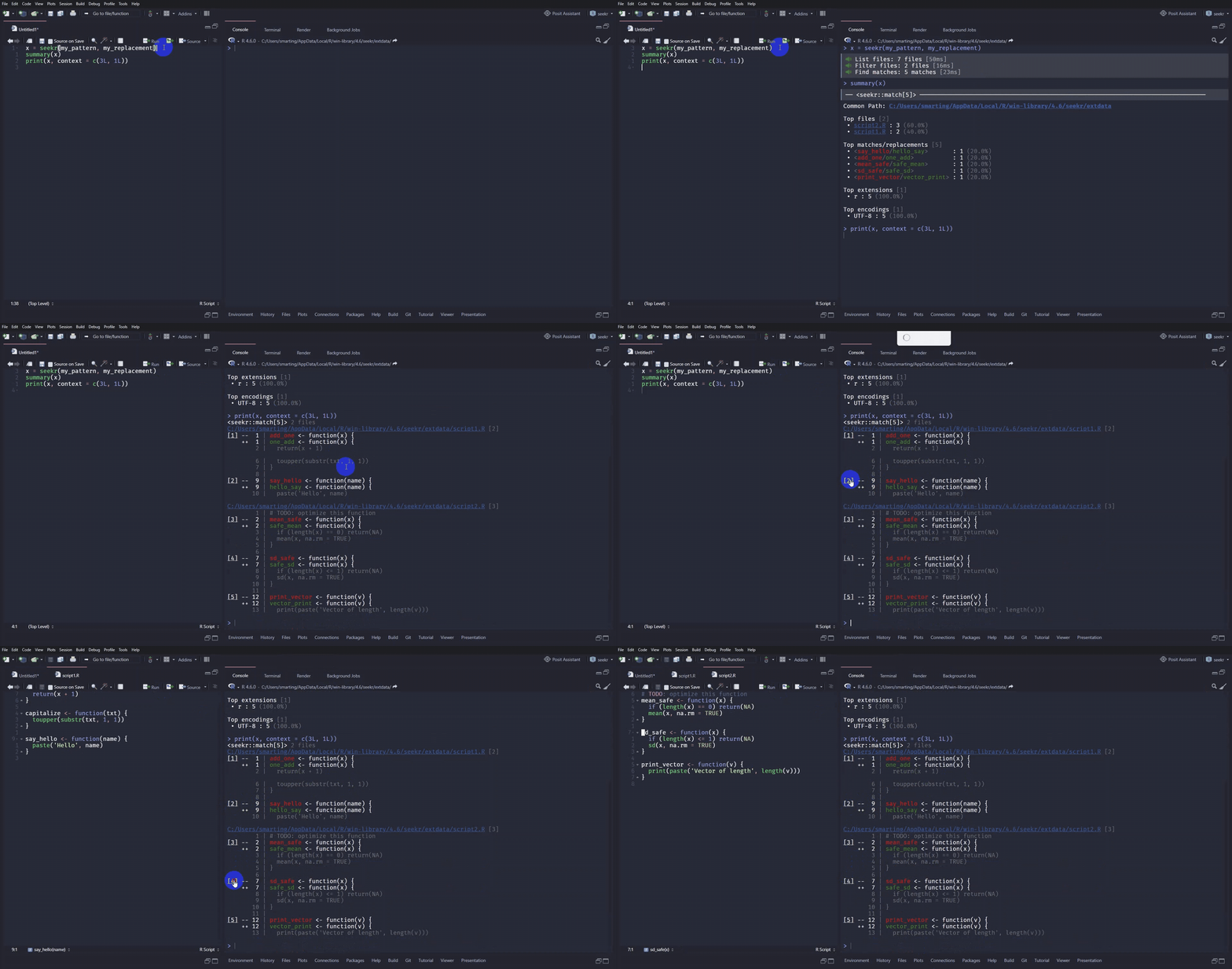
Instead of modifying files as soon as a pattern is found, seekr returns a seekr_match vector. Each element represents one match in one file and stores its location, matched text, surrounding context lines, and optional replacement.
You can keep working with that vector after the search: inspect the result, remove unwanted matches, and define or revise the replacement associated with each remaining match. When you are ready, only those matches are written back to disk.
The Design choices article explains why seekr uses this representation and how it makes safe replacement possible.
In real projects, search-and-replace often raises questions beyond finding a pattern: Which files were considered? Which files were excluded, and why? Which matches were found? Which replacements will be applied? Can I keep only some matches? Can I restore the previous file contents if needed?
seekr provides a set of functions that make this workflow explicit, composable, and safe:
-
List files with
list_files(). Start from one or more directories, recurse into subdirectories, optionally restrict discovery with Git, and get a normalized character vector of file paths. -
Filter files with
filter_files(). Keep files by extension, path pattern, or size, and use a sensible default set of exclude functions to remove files that should not be searched. -
Understand exclusions with
exclusions(). Inspect which files were excluded and why, instead of silently excluding files by mistake. -
Match patterns with
match_files(), or useseek()to combine listing, filtering, and matching in one call. Replacements can be literal strings, backreferences, functions, or functions that operate on the capture group matrix. -
Summarize matches with
summary(). Get a compact overview of the number of matches, their distribution by file and extension, and the frequency of each match/replacement pair. -
Print matches with
print(). Inspect matches with surrounding context, preview replacements, and use rich terminal output with clickable OSC8 links when supported. -
Filter matches with
filter_match(). Keep or discard matches after searching, without running the search again. -
Set or update replacements with
field(). Search first, inspect the result, then update thereplacementfield to decide what each selected match should become before writing files. -
Replace selected matches with
replace_files(). Starting from aseekr_matchvector,replace_files()checks that each affected file still has the same text that was searched, then replaces only the matches still present in the vector with their corresponding replacements. -
Inspect and restore backups with
list_backups(),last_backup(),restore_files(), andrestore_files_interactive(). Review automatic backups and recover previous file contents if something did not go as expected.
For more advanced workflows, a seekr_match vector can also be converted to a data frame and converted back with as_match(). This can make it easier to create custom summaries, filter matches, or prepare replacements with grouped operations. For a detailed example, see the Tabular workflows article.
If your text does not come directly from files, or if you want to control reading and writing yourself, see the Working with text article.
For larger repositories or performance-sensitive searches, see the Performance notes article.
Patterns are powered by stringr and ICU regular expressions, so you can use familiar tools such as stringr::regex(), stringr::fixed(), and stringr::coll() when you need more control.
Installation
# Install the package from CRAN:
install.packages("seekr")

# Or the the development version from GitHub:
# install.packages("pak")
pak::pak("smartiing/seekr")
Usage
Find matches
First, list all files that could be searched.
files <- list_files()
files
#> [1] "C:/Users/smarting/AppData/Local/Temp/Rtmp6rAmJE/seekr-example/extdata/config.yaml"
#> [2] "C:/Users/smarting/AppData/Local/Temp/Rtmp6rAmJE/seekr-example/extdata/data.json"
#> [3] "C:/Users/smarting/AppData/Local/Temp/Rtmp6rAmJE/seekr-example/extdata/iris.csv"
#> [4] "C:/Users/smarting/AppData/Local/Temp/Rtmp6rAmJE/seekr-example/extdata/mtcars.csv"
#> [5] "C:/Users/smarting/AppData/Local/Temp/Rtmp6rAmJE/seekr-example/extdata/script1.R"
#> [6] "C:/Users/smarting/AppData/Local/Temp/Rtmp6rAmJE/seekr-example/extdata/script2.R"
#> [7] "C:/Users/smarting/AppData/Local/Temp/Rtmp6rAmJE/seekr-example/extdata/server1.log"
#> [8] "C:/Users/smarting/AppData/Local/Temp/Rtmp6rAmJE/seekr-example/extdata/server2.log"
Then filter to keep only R files. filter_files() records which files were excluded and why. The exclusions attribute can be retrieved using exclusions().
filtered <- filter_files(files, extension = "R")
filtered
#> [1] "C:/Users/smarting/AppData/Local/Temp/Rtmp6rAmJE/seekr-example/extdata/script1.R"
#> [2] "C:/Users/smarting/AppData/Local/Temp/Rtmp6rAmJE/seekr-example/extdata/script2.R"
#> attr(,"exclusions")
#> # A tibble: 8 × 7
#>   path                                                    excluded exclude_by_extension is_git_dir is_dependency_dir is_minified_file is_not_text_mime
#>   <chr>                                                   <lgl>    <lgl>                <lgl>      <lgl>             <lgl>            <lgl>
#> 1 C:/Users/smarting/AppData/Local/Temp/Rtmp6rAmJE/seekr-… TRUE     TRUE                 NA         NA                NA               NA
#> 2 C:/Users/smarting/AppData/Local/Temp/Rtmp6rAmJE/seekr-… TRUE     TRUE                 NA         NA                NA               NA
#> 3 C:/Users/smarting/AppData/Local/Temp/Rtmp6rAmJE/seekr-… TRUE     TRUE                 NA         NA                NA               NA
#> 4 C:/Users/smarting/AppData/Local/Temp/Rtmp6rAmJE/seekr-… TRUE     TRUE                 NA         NA                NA               NA
#> 5 C:/Users/smarting/AppData/Local/Temp/Rtmp6rAmJE/seekr-… FALSE    FALSE                FALSE      FALSE             FALSE            FALSE
#> 6 C:/Users/smarting/AppData/Local/Temp/Rtmp6rAmJE/seekr-… FALSE    FALSE                FALSE      FALSE             FALSE            FALSE
#> 7 C:/Users/smarting/AppData/Local/Temp/Rtmp6rAmJE/seekr-… TRUE     TRUE                 NA         NA                NA               NA
#> 8 C:/Users/smarting/AppData/Local/Temp/Rtmp6rAmJE/seekr-… TRUE     TRUE                 NA         NA                NA               NA
Now that we have a list of files, we can search for function names composed of at least two words separated by an underscore and prepare a replacement that reverses them.
my_pattern <- "([a-z]+)_([a-z]+)(?= <- function)"
my_replacement <- "\\2_\\1"

x <- match_files(filtered, my_pattern, my_replacement)
The listing, filtering, and matching steps can also be combined in one step with seek(). seekr() is a convenience wrapper around seek() that restricts the search to R, R Markdown, and Quarto files (.R, .Rmd, .qmd).
Inspect matches
x is a seekr_match vector. It behaves like a vector of matches, but each match also stores fields that can be inspected with fields() and accessed with field().
str(x)
#> <seekr::match[5]> vctrs::rcrd
#> path        <chr> "C:/Users/smarting/AppData/Local/Temp/Rtmp6rAmJE/seekr-example/extdata/script1.R", "C:/Users/smarting/AppData/Local/Temp/Rtmp6rAmJE/…
#> start_line  <int> 1, 9, 2, 7, 12
#> end_line    <int> 1, 9, 2, 7, 12
#> start       <int> 1, 107, 32, 119, 202
#> end         <int> 7, 115, 40, 125, 213
#> start_col   <int> 1, 1, 1, 1, 1
#> end_col     <int> 7, 9, 9, 7, 12
#> match       <chr> "add_one", "say_hello", "mean_safe", "sd_safe", "print_vector"
#> replacement <chr> "one_add", "hello_say", "safe_mean", "safe_sd", "vector_print"
#> before      <chr> NA, "\ncapitalize <- function(txt) {\n  toupper(substr(txt, 1, 1))\n}\n", "# TODO: optimize this function", "mean_safe <- function(x…
#> line        <chr> "add_one <- function(x) {", "say_hello <- function(name) {", "mean_safe <- function(x) {", "sd_safe <- function(x) {", "print_vector…
#> after       <chr> "  return(x + 1)\n}\n\ncapitalize <- function(txt) {\n  toupper(substr(txt, 1, 1))", "  paste('Hello', name)\n}\n", "  if (length(x)…
#> encoding    <chr> "UTF-8", "UTF-8", "UTF-8", "UTF-8", "UTF-8"
#> hash        <chr> "64a0df249c4d06303279cefc18f90dab", "64a0df249c4d06303279cefc18f90dab", "2f39361ab4ba30df0d4f2d4fcb002d21", "2f39361ab4ba30df0d4f2d4…
fields(x)
#>  [1] "path"        "start_line"  "end_line"    "start"       "end"         "start_col"   "end_col"     "match"       "replacement" "before"
#> [11] "line"        "after"       "encoding"    "hash"
field(x, "match")
#> [1] "add_one"      "say_hello"    "mean_safe"    "sd_safe"      "print_vector"
field(x, "replacement")
#> [1] "one_add"      "hello_say"    "safe_mean"    "safe_sd"      "vector_print"
Use summary() to get a compact overview of the matches and planned replacements.
summary(x)
#> ── <seekr::match[5]> ─────────────────────────────────────────────────────────────────────────────────────────────────────────────────────────────────
#> Common Path: C:/Users/smarting/AppData/Local/Temp/Rtmp6rAmJE/seekr-example/extdata
#>
#> Top sources [2]
#>  • script2.R : 3 (60.0%)
#>  • script1.R : 2 (40.0%)
#>
#> Top matches/replacements [5]
#>  • <say_hello/hello_say>       : 1 (20.0%)
#>  • <add_one/one_add>           : 1 (20.0%)
#>  • <mean_safe/safe_mean>       : 1 (20.0%)
#>  • <sd_safe/safe_sd>           : 1 (20.0%)
#>  • <print_vector/vector_print> : 1 (20.0%)
#>
#> Top extension [1]
#>  • r : 5 (100.0%)
#>
#> Top encoding [1]
#>  • UTF-8 : 5 (100.0%)
Use print() to inspect each match with surrounding context and preview the replacement.
print(x, context = c(0, 3))
#> <seekr::match[5]> 2 sources
#> Common Path: C:/Users/smarting/AppData/Local/Temp/Rtmp6rAmJE/seekr-example/extdata
#>
#> script1.R [2]
#> [1] --  1 | add_one <- function(x) {
#>     ++  1 | one_add <- function(x) {
#>         2 |   return(x + 1)
#>         3 | }
#>         4 |
#>
#> [2] --  9 | say_hello <- function(name) {
#>     ++  9 | hello_say <- function(name) {
#>        10 |   paste('Hello', name)
#>        11 | }
#>        12 |
#>
#> script2.R [3]
#> [3] --  2 | mean_safe <- function(x) {
#>     ++  2 | safe_mean <- function(x) {
#>         3 |   if (length(x) == 0) return(NA)
#>         4 |   mean(x, na.rm = TRUE)
#>         5 | }
#>
#> [4] --  7 | sd_safe <- function(x) {
#>     ++  7 | safe_sd <- function(x) {
#>         8 |   if (length(x) <= 1) return(NA)
#>         9 |   sd(x, na.rm = TRUE)
#>        10 | }
#>
#> [5] -- 12 | print_vector <- function(v) {
#>     ++ 12 | vector_print <- function(v) {
#>        13 |   print(paste('Vector of length', length(v)))
#>        14 | }
#>        15 |
Filter matches and update replacements
Matches can be filtered without reading the files again. Here, we remove matches whose matched text contains "safe".
x <- filter_match(x, !grepl("safe", match))
print(x, context = c(0L, 2L))
#> <seekr::match[3]> 2 sources
#> Common Path: C:/Users/smarting/AppData/Local/Temp/Rtmp6rAmJE/seekr-example/extdata
#>
#> script1.R [2]
#> [1] --  1 | add_one <- function(x) {
#>     ++  1 | one_add <- function(x) {
#>         2 |   return(x + 1)
#>         3 | }
#>
#> [2] --  9 | say_hello <- function(name) {
#>     ++  9 | hello_say <- function(name) {
#>        10 |   paste('Hello', name)
#>        11 | }
#>
#> script2.R [1]
#> [3] -- 12 | print_vector <- function(v) {
#>     ++ 12 | vector_print <- function(v) {
#>        13 |   print(paste('Vector of length', length(v)))
#>        14 | }
Replacements can also be set or updated after inspection. Here, we convert the replacement to upper case and preview the result.
field(x, "replacement") = toupper(field(x, "replacement"))
print(x, context = c(0, 2))
#> <seekr::match[3]> 2 sources
#> Common Path: C:/Users/smarting/AppData/Local/Temp/Rtmp6rAmJE/seekr-example/extdata
#>
#> script1.R [2]
#> [1] --  1 | add_one <- function(x) {
#>     ++  1 | ONE_ADD <- function(x) {
#>         2 |   return(x + 1)
#>         3 | }
#>
#> [2] --  9 | say_hello <- function(name) {
#>     ++  9 | HELLO_SAY <- function(name) {
#>        10 |   paste('Hello', name)
#>        11 | }
#>
#> script2.R [1]
#> [3] -- 12 | print_vector <- function(v) {
#>     ++ 12 | VECTOR_PRINT <- function(v) {
#>        13 |   print(paste('Vector of length', length(v)))
#>        14 | }
Replace selected matches
Now that the vector is ready, replace_files() can apply only the matches still present, each with its corresponding replacement.
Before writing, replace_files() checks that every selected match has a replacement and that the hash of each affected file still matches the hash recorded when the seekr_match vector was created. If a file has changed since the search, replacement stops and the search should be run again on the current file contents.
In this example, the replacement strings still match my_pattern if we ignore the case. This lets us search again and verify that the three selected matches were replaced, while the two excluded matches were left unchanged.
seekr(regex(my_pattern, ignore_case = TRUE))
#> <seekr::match[5]> 2 sources
#> Common Path: C:/Users/smarting/AppData/Local/Temp/Rtmp6rAmJE/seekr-example/extdata
#>
#> script1.R [2]
#> [1] ->  1 | ONE_ADD <- function(x) {
#> [2] ->  9 | HELLO_SAY <- function(name) {
#>
#> script2.R [3]
#> [3] ->  2 | mean_safe <- function(x) {
#> [4] ->  7 | sd_safe <- function(x) {
#> [5] -> 12 | VECTOR_PRINT <- function(v) {
Restore files
By default, replace_files() creates a backup in the default backup_dir before modifying files. The latest backup can be retrieved with last_backup().
bck <- last_backup()
bck
#> # A tibble: 2 × 9
#>      id created_at          operation description original                                                  backup original_exists backup_exists  size
#>   <int> <dttm>              <chr>     <chr>       <chr>                                                     <chr>  <lgl>           <lgl>         <fs:>
#> 1     1 2026-07-14 17:07:59 replace   <NA>        C:/Users/smarting/AppData/Local/Temp/Rtmp6rAmJE/seekr-ex… C:/Us… TRUE            TRUE            161
#> 2     1 2026-07-14 17:07:59 replace   <NA>        C:/Users/smarting/AppData/Local/Temp/Rtmp6rAmJE/seekr-ex… C:/Us… TRUE            TRUE            279
Use restore_files() to restore the previous file contents from the backup.
restore_files(from = bck$backup, to = bck$original)
#> ℹ Creating a backup of the current version of each existing destination file before restoring it.
#> ℹ This ensures you can revert to the state before restoration if needed.
restore_files() also creates a backup, by default, before restoring files.
list_backups()
#> # A tibble: 4 × 9
#>      id created_at          operation description original                                                  backup original_exists backup_exists  size
#>   <int> <dttm>              <chr>     <chr>       <chr>                                                     <chr>  <lgl>           <lgl>         <fs:>
#> 1     2 2026-07-14 17:07:59 restore   <NA>        C:/Users/smarting/AppData/Local/Temp/Rtmp6rAmJE/seekr-ex… C:/Us… TRUE            TRUE            161
#> 2     2 2026-07-14 17:07:59 restore   <NA>        C:/Users/smarting/AppData/Local/Temp/Rtmp6rAmJE/seekr-ex… C:/Us… TRUE            TRUE            279
#> 3     1 2026-07-14 17:07:59 replace   <NA>        C:/Users/smarting/AppData/Local/Temp/Rtmp6rAmJE/seekr-ex… C:/Us… TRUE            TRUE            161
#> 4     1 2026-07-14 17:07:59 replace   <NA>        C:/Users/smarting/AppData/Local/Temp/Rtmp6rAmJE/seekr-ex… C:/Us… TRUE            TRUE            279
Once the files have been restored, the original files are back.
x_restored <- seekr(my_pattern, my_replacement)
identical(y, x_restored)
#> [1] TRUE
print(x_restored)
#> <seekr::match[5]> 2 sources
#> Common Path: C:/Users/smarting/AppData/Local/Temp/Rtmp6rAmJE/seekr-example/extdata
#>
#> script1.R [2]
#> [1] --  1 | add_one <- function(x) {
#>     ++  1 | one_add <- function(x) {
#> [2] --  9 | say_hello <- function(name) {
#>     ++  9 | hello_say <- function(name) {
#>
#> script2.R [3]
#> [3] --  2 | mean_safe <- function(x) {
#>     ++  2 | safe_mean <- function(x) {
#> [4] --  7 | sd_safe <- function(x) {
#>     ++  7 | safe_sd <- function(x) {
#> [5] -- 12 | print_vector <- function(v) {
#>     ++ 12 | vector_print <- function(v) {
Pipe workflow
The main seekr functions are designed to compose: the output of one step can usually be passed directly to the next. In real use, you will often pause to inspect, filter, or update the result, but the pipe form makes the structure of the workflow clear.
x <-
  list_files() |>
  filter_files(extension = "R") |>
  match_files(my_pattern, my_replacement) |>
  filter_match(!grepl("safe", match)) |>
  replace_files()